Proxmox LVM on Top of iSCSI / FC / SAS with multipathing

Multipath enables redundant access even if one or more components in a path fail. You also benefit from increased throughput thanks to load balancing. This is how it works with Proxmox.

Foreword

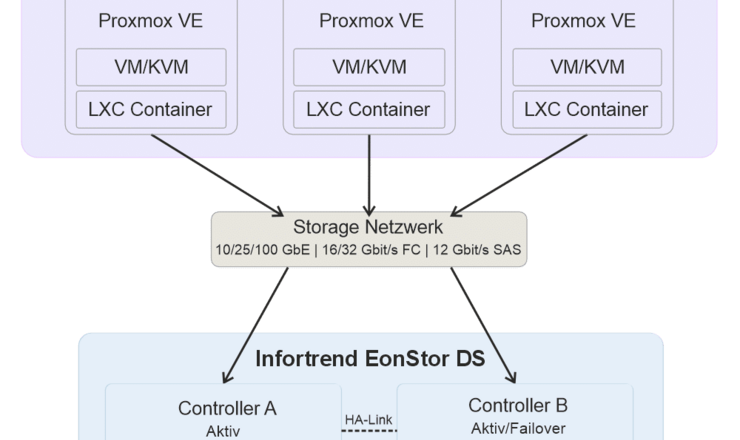
Fibre Channel and iSCSI are both block-based protocols and can be used with Proxmox. If these are to be used in a cluster as shared storage, LVM-Thick (LVM) must be selected. LVM-Thin is not possible here, as this is not cluster-capable => only use for a single node. If several paths exist for the LUN/targets, multipathing must be configured via the shell.

SAS / FC

Target integration

The integration of SAS/FC LUNs under Proxmox is very simple. Since Proxmox is based on Debian, any SAS/FC HBAs that Debian supports are supported.

SAS/FC LUNs are automatically recognized under Proxmox and can be retrieved with the command “lsblk” in the shell.

To ensure that this is the same LUN, the following can help:
# ls -l /dev/disk/by-path
total 0
lrwxrwxrwx 1 root root 9 Aug 7 09:57 pci-0000:27:00.0-fc-0x5000001231231234-lun-0 -> ../../sdb
lrwxrwxrwx 1 root root 9 Aug 7 09:57 pci-0000:27:00.1-fc-0x5000001231231234-lun-0 -> ../../sdc
[...]

Here we see the identical ID twice on two different sdX assignments. => Therefore two paths. This may be more depending on the environment.

If the LUNs are not recognized automatically, check the zoning configuration of your FC switches or the shares of your SAN. If necessary, also check whether your SAS/FC HBA has been recognized and is establishing a link. In this case, please carry out the Configure Mutlipath section.

If you only have one path in total, you can jump directly to Configure LVM.

iSCSI

Renaming the iSCSI Initiator Name

We recommend changing the iSCSI initiator name of each PVE node. This makes future troubleshooting easier. This can be found under /etc/iscsi/initiatorname.iscsi

Original: InitiatorName=iqn.1993-08.org.debian:01:bb88f6a25285

Modified: InitiatorName=iqn.1993-08.org.debian:01:<Hostname>

Here we would recommend the host name of the node at the end. For example pve01 or pve02 etc. However, never assign an identical name.

Configuration of the iSCSI service

Change the following options in the /etc/iscsi/iscsid.conf file:

node.startup = automatic

node.leading_login = No

node.session.timeo.replacement_timeout = 15

node.session.initial_login_retry_max = 64

Restart the node.

Integration of the targets

Before connecting the iSCSI targets, determine all iqn port names with the following command:

iscsiadm -m discovery -t sendtargets -p <IP-address>:3260

You can then connect the targets individually. After the first connection, the target is saved and should be reconnected automatically:

iscsiadm --mode node --targetname <IQN> -p <IP-address> --login

Sometimes the targets are also integrated directly after the discovery and no further addition is necessary.

For example, for 4 paths:

  1. iscsiadm --mode node --targetname iqn.2000-08.com.datacore:pve-sds11-fe1 -p 172.16.41.21 --login
  2. iscsiadm --mode node --targetname iqn.2000-08.com.datacore:pve-sds11-fe2 -p 172.16.42.21 --login
  3. iscsiadm --mode node --targetname iqn.2000-08.com.datacore:pve-sds10-fe1 -p 172.16.41.20 --login
  4. iscsiadm --mode node --targetname iqn.2000-08.com.datacore:pve-sds10-fe2 -p 172.16.42.20 –login


You can then display all active sessions with the following command:
iscsiadm --mode session --print=1

Checking the targets

Each target is created individually here. Check the following file for each target/portal:

/etc/iscsi/nodes/<TARGET>/<PORTAL>/default

The following value must look like this:

node.startup must be set to automatic.

This should already be the case if you have previously configured iscsid.conf.

In this example, we have a LUN with two paths each. Two paths from the SAN and two paths from the client. Therefore, we now see the drive four times:

Proxmox - iSCSI_FC Multipath Setup mit LVM1

Configure multipath

The multipath configuration is identical for FC and iSCSI. This must be configured for all nodes in the cluster.

Installation

By default, the mutlipath package is not installed under Proxmox and must be installed later:

  1. apt update
  2. apt install multipath-tools

After installation, the disk can already be configured for multipath.

Identification of the WWID

We recommend the use of WWIDs to identify LUNs. You can use the scsi_id command to query the WWID for a specific /dev/sdX device.
/lib/udev/scsi_id -g -u -d /dev/sdX
Example: sdb and sdc correspond to two paths to the same LUN with WWID 3600144f028f88a0000005037a95d0001:

# /lib/udev/scsi_id -g -u -d /dev/sdb 3600144f028f88a0000005037a95d0001
# /lib/udev/scsi_id -g -u -d /dev/sdc 3600144f028f88a0000005037a95d0001

Adding the WWIDs

By default, you must add the WWIDs of all LUNs with multiple paths to the /etc/multipath/wwids file. To do this, execute the following commands with the corresponding WWID:
multipath -a WWID

An example of the WWID 3600144f028f88a0000005037a95d0001:

# multipath -a 3600144f028f88a0000005037a95d0001

To activate these settings, you must do the following:

multipath -r

This only needs to be carried out once for each LUN.

Control

You can see the current status of multipath as follows:

multipath -ll

An mpath type should now also have been added to lsblk.

Proxmox - iSCSI_FC Multipath Setup mit LVM2

Additionally required for FC

If you are using LVM on an FC or SAS LUN, we recommend installing the multipath-tools-boot package:

apt install multipath-tools-boot

If this package is installed, /etc/multipath.conf and /etc/multipath/wwids are copied to the initramfs. After changing these files (e.g. by multipath -a WWID), you must therefore recreate the initramfs:

update-initramfs -u -k all

Background

Optional alias assignment

After successful configuration of Multipath, we must now use the /dev/mapper assignment in the future.

For example, for 3600144f028f88a0000005037a95d0001 the path would be

/dev/mapper/3600144f028f88a0000005037a95d0001

There is also a way to give this ID an alias. The file /etc/multipath.conf must be created for this.

nano /etc/multipath.conf

To rename the WWID to mpath0, for example, the following entry would be conceivable:

multipaths {

  multipath {

    wwid "3600144f028f88a0000005037a95d0001"

    alias mpath0

  }

}

Then save with Ctrl +X -> Y -> Enter and reload the configuration with

multipath -r

The multipath LUN should now be available under /dev/mapper/mpath0.

Configure LVM

After successful configuration of Multipath, we must now use the /dev/mapper assignment in the future.

For example, for 3600144f028f88a0000005037a95d0001, the WWID would be /dev/mapper/3600144f028f88a0000005037a95d0001

If you have performed Optional Alias Assignment as above, use this assignment.

The following commands create a PV and a VG on the LUN (replace DEVICE_NAME with the name of the multipath device and VG_NAME with the desired name for the VG):

  1. pvcreate /dev/mapper/DEVICE_NAME
  2. vgcreate VG_NAME /dev/mapper/DEVICE_NAME

You can then create an LVM storage for this VG in the Proxmox GUI.

VG in der Proxmox-GUI2

To 5: Assign a desired ID for how the storage should be named.

To 6: Select your previously created VG.

To 7: If several Proxmox VE nodes can access the LUN, activate “Shared Storage”.

In a Proxmox VE cluster, the new PV and VG may not be immediately visible on all nodes. To make them visible on all nodes, you can either restart all nodes or execute the following command on all nodes:

pvscan --cache

Notes:

Any questions?

starline_logo_kontur_300
Enterprise Storage Solutions Team
Technik

Our experts are of course also experts in Linux, Ceph and ZFS